需求
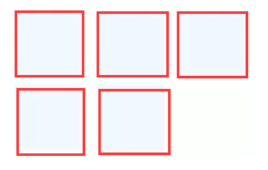
解决方案:
最近遇到布局上要求 Item 两端对齐,且最后一行在列不满的情况下要求左对齐,使用 Flex 的justify-content:space-between;实现时发现最后一行不能左对齐,而是两端对齐方式。
不是项目上想要的效果
经查相关资料,可通过以下方法实现效果:
- 添加几个空Item(适用于大多数场景)
根据布局列数添加空Item,比如每行最大N列,那么在最后添加 N-2 个空Item即可。
1
2
3
4
5
6
7
8
9
10
11
12
13
14
15
16
17
18
19
20
21
22
23
24
25
26
27
28
29
30
31
32
33
| <html>
<style>
.box {
display: flex;
flex-wrap: wrap;
justify-content: space-between;
}
.item {
width: 30%;
height: 50px;
background-color: #f1f8ff;
margin-bottom: 10px;
}
.placeholder {
width: 30%;
height: 0px;
}
</style>
<body>
<div class="box">
<div class="item"></div>
<div class="item"></div>
<div class="item"></div>
<div class="item"></div>
<div class="item"></div>
<div class="placeholder"></div>
</div>
</body>
</html>
|
- 利用伪元素after(适用于每行3列,快速方法)
1
2
3
4
5
6
7
8
9
10
11
12
13
14
15
16
17
18
19
20
21
22
23
24
25
26
27
28
29
30
31
32
33
34
| <html>
<style>
.box {
display: flex;
flex-wrap: wrap;
justify-content: space-between;
}
.item {
width: 30%;
height: 50px;
background-color: #f1f8ff;
margin-bottom: 10px;
}
.box::after {
display: block;
content: "";
width: 30%;
height: 0;
}
</style>
<body>
<div class="box">
<div class="item"></div>
<div class="item"></div>
<div class="item"></div>
<div class="item"></div>
<div class="item"></div>
</div>
</body>
</html>
|